Color
The color classes provide access to the standard 16 terminal colors and their combinations. You use them throughout the library to style terminal output, buffer cells, and text elements.
The following table shows the available foreground and background colors, as well as all combinations of them:
              Foregrounds                             Backgrounds               |
 black               bright_black        black               bright_black       |
 red                 bright_red          red                 bright_red         |
 green               bright_green        green               bright_green       |
 yellow              bright_yellow       yellow              bright_yellow      |
 blue                bright_blue         blue                bright_blue        |
 magenta             bright_magenta      magenta             bright_magenta     |
 cyan                bright_cyan         cyan                bright_cyan        |
 white               bright_white        white               bright_white       |


  0    1    2    3    4    5    6    7    8    9   10   11   12   13   14   15  |
 16   17   18   19   20   21   22   23   24   25   26   27   28   29   30   31  |
 32   33   34   35   36   37   38   39   40   41   42   43   44   45   46   47  |
 48   49   50   51   52   53   54   55   56   57   58   59   60   61   62   63  |
 64   65   66   67   68   69   70   71   72   73   74   75   76   77   78   79  |
 80   81   82   83   84   85   86   87   88   89   90   91   92   93   94   95  |
 96   97   98   99   100  101  102  103  104  105  106  107  108  109  110  111 |
 112  113  114  115  116  117  118  119  120  121  122  123  124  125  126  127 |
 128  129  130  131  132  133  134  135  136  137  138  139  140  141  142  143 |
 144  145  146  147  148  149  150  151  152  153  154  155  156  157  158  159 |
 160  161  162  163  164  165  166  167  168  169  170  171  172  173  174  175 |
 176  177  178  179  180  181  182  183  184  185  186  187  188  189  190  191 |
 192  193  194  195  196  197  198  199  200  201  202  203  204  205  206  207 |
 208  209  210  211  212  213  214  215  216  217  218  219  220  221  222  223 |
 224  225  226  227  228  229  230  231  232  233  234  235  236  237  238  239 |
 240  241  242  243  244  245  246  247  248  249  250  251  252  253  254  255 |
Usage
Applying Colors Directly
Use Foreground,
Background, and
Color to apply explicit styling to
terminal output or buffer cells.
auto accent = Color{fg::BrightCyan, bg::Black};
auto warning = accent.overlayWith(Color{fg::BrightYellow, bg::Red});

terminal.printLine(accent, "Normal status");
terminal.printLine(warning, "Escalated status");
In this example, overlayWith() combines two colors. This lets you
derive variations from an existing style while keeping unchanged parts
intact.
Use Default when you want to reset a foreground or background to the
terminal’s default color.
Use Inherited when a layer should keep the color from what is already
rendered below—for example when composing buffer cells or applying
partial styling.
Serializing Palette Values
For configuration files or theme definitions, colors can also be treated as stable, named palette entries.
ColorBase::Value is the shared enum behind foreground and background
colors. ColorPart::fromString() and toString() convert
between these enum values and human-readable names.
const auto foreground = Foreground::fromString("bright_cyan");
const auto background = Background::fromString("black");
const auto accent = Color{foreground, background};

terminal.printLine(accent, "Configured from text");
This makes it easy to load themes from text files or serialize color choices for later reuse.
Building Animated Palettes
ColorSequence represents an ordered list of colors. You can use it to
build gradients, rotating palettes, or animated visual effects.
auto titleColors = ColorSequence{
    Color{fg::BrightBlue, bg::Black},
    Color{fg::BrightCyan, bg::Black},
    Color{fg::BrightMagenta, bg::Black},
    Color{fg::BrightYellow, bg::Black},
};

auto currentColor = titleColors.colorNormalized(0.35);
terminal.printLine(currentColor, "Animated headline");
colorNormalized() selects a color based on a normalized position in
the range 0.0 to 1.0. This makes it straightforward to drive color
changes using animation cycles, time values, or progress indicators.
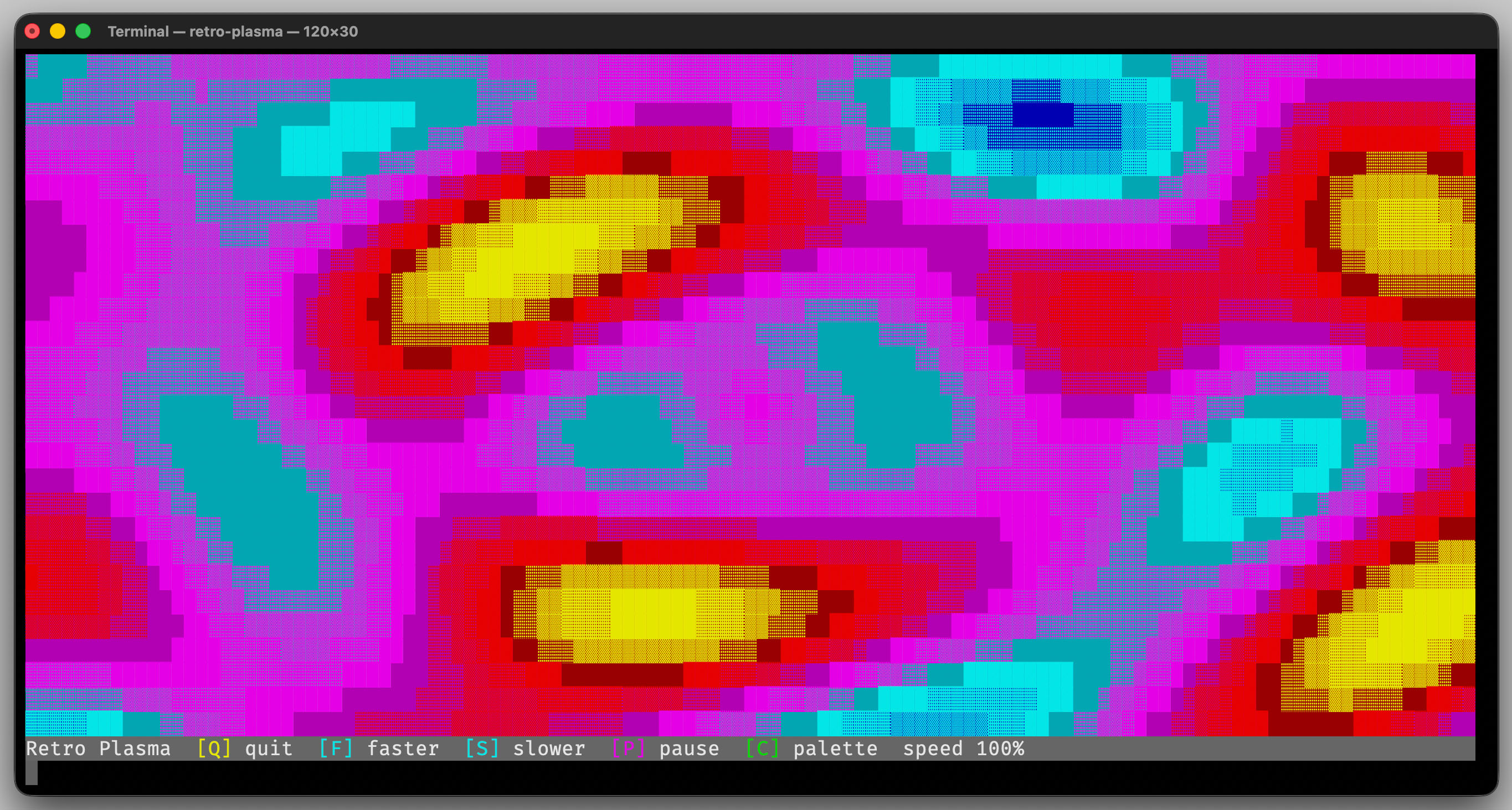
The retro-plasma demo uses ColorSequence to switch between
multiple animated palettes.
Interface
-
class Color
A foreground/background color pair for terminal rendering.
Public Functions
-
Color() = default
Create a color that inherits both components from the layer below.
If no lower layer exists, terminal output resolves inherited colors to the terminal defaults.
-
inline constexpr Color(const Foreground foreground, const Background background) noexcept
Create a color from explicit foreground and background parts.
- Parameters:
foreground – The foreground color.
background – The background color.
-
inline constexpr Color(const Foreground foreground) noexcept
Create a color with an explicit foreground and inherited background color.
- Parameters:
foreground – The background color.
-
inline constexpr Color(const Foreground::Hue foreground) noexcept
This is an overloaded member function, provided for convenience. It differs from the above function only in what argument(s) it accepts.
-
inline constexpr Color(const Background background) noexcept
Create a color with an explicit background and inherited foreground color.
- Parameters:
background – The background color.
-
inline constexpr Color(const Background::Hue background) noexcept
This is an overloaded member function, provided for convenience. It differs from the above function only in what argument(s) it accepts.
-
~Color() = default
Destroy the color value.
-
inline Foreground fg() const noexcept
Get the foreground color.
-
inline void setFg(const Foreground foreground) noexcept
Set the foreground color.
- Parameters:
foreground – The new foreground color.
-
inline Background bg() const noexcept
Get the background color.
-
inline void setBg(const Background background) noexcept
Set the background color.
- Parameters:
background – The new background color.
-
Color overlayWith(const Color &overlay) const
Combine this color with a new overlay color.
Foreground or background components set to
Inheritedkeep the value from this color. Components set toDefaultexplicitly reset to the terminal default color.Examples:
[this.fg = red] + [new.fg = inherited] => [result.fg = red]
[this.fg = red] + [new.fg = default] => [result.fg = default]
[this.fg = red] + [new.fg = green] => [result.fg = green]
- Parameters:
overlay – The overlay color.
- Returns:
The new color with the overlay applied.
-
inline constexpr std::size_t hash() const noexcept
Get a hash for this color pair.
Public Members
-
Foreground _foreground
Foreground component of the color.
-
Background _background
Background component of the color.
Public Static Functions
-
static Color fromString(std::string_view str)
Convert a color or color-pair into a block color.
Format must be either
"fg"or"fg:bg". Foreground and background names accept spaces, underscores, and hyphens between words.- Parameters:
str – The textual color specification.
- Throws:
std::invalid_argument – if one of the colors does not exist.
- Returns:
The parsed color.
-
static inline Color fromIndex16(const int fgIndex, const int bgIndex)
Converts two indexes into a color-pair.
See also
ColorPart::fromIndex16 for details.
-
Color() = default
-
class ColorBase
Shared implementation for foreground and background color values.
Subclassed by erbsland::cterm::ColorPart< ColorRole::Foreground >, erbsland::cterm::ColorPart< ColorRole::Background >, erbsland::cterm::ColorPart< tColorType >
Public Types
-
enum class Value : uint8_t
Internal color identifiers used for ANSI conversion and parsing.
Values:
-
enumerator Black
Black.
-
enumerator Red
Dark red.
-
enumerator Green
Dark green.
-
enumerator Yellow
Dark yellow.
-
enumerator Blue
Dark blue.
-
enumerator Magenta
Dark magenta.
-
enumerator Cyan
Dark cyan.
-
enumerator White
Light gray.
-
enumerator BrightBlack
Gray.
-
enumerator BrightRed
Bright red.
-
enumerator BrightGreen
Bright green.
-
enumerator BrightYellow
Yellow.
-
enumerator BrightBlue
Blue.
-
enumerator BrightMagenta
Magenta.
-
enumerator BrightCyan
Cyan.
-
enumerator BrightWhite
White.
-
enumerator Default
The default color of the terminal.
-
enumerator Inherited
Inherited color from the layer below, or use the default color.
-
enumerator _Count
-
enumerator Black
-
enum class Value : uint8_t
-
template<ColorRole tColorType>
class ColorPart : public erbsland::cterm::ColorBase A foreground or background color.
Public Functions
-
ColorPart() = default
Create the inherited color for this role.
The inherited color uses the value from the layer below, or the terminal default if no lower layer exists.
-
inline constexpr ColorPart(const Hue color)
Create a color from one of the predefined hue constants.
- Parameters:
color – The named hue.
-
inline int ansiCode() const noexcept
Convert this color part to its ANSI SGR numeric code.
- Returns:
The numeric ANSI code for this color role.
-
inline constexpr std::size_t hash() const noexcept
Get a hash for this color part.
The color role is included so foreground and background values use distinct hash domains.
Public Static Functions
-
static inline ColorPart fromString(const std::string_view str)
Create a color from the given string.
Accepts lowercase names as well as space-, underscore-, or hyphen-separated variants.
- Parameters:
str – The color name.
- Throws:
std::invalid_argument – if the color does not exist.
- Returns:
The parsed color.
-
static inline ColorPart fromIndex16(const int index)
Create a color from the given index.
- Parameters:
index – The index from 0 (black) to 15 (bright white), <0 = inherited, 16+ = default
- Returns:
The color.
-
static inline std::array<ColorPart, 8> allBaseColors() noexcept
Access the eight non-bright base colors in ANSI order.
Use with
.brighter()to get the bright color variants.
Public Static Attributes
-
static constexpr auto cCodeBase = (tColorType == ColorRole::Foreground ? 30 : 40)
Base ANSI escape code for this color role.
-
ColorPart() = default
-
enum class erbsland::cterm::ColorRole : uint8_t
The type color.
Values:
-
enumerator Foreground
-
enumerator Background
-
enumerator Foreground
-
using erbsland::cterm::Background = ColorPart<ColorRole::Background>
The background color.
-
using erbsland::cterm::bg = Background
Short alias for
Background.
-
using erbsland::cterm::Foreground = ColorPart<ColorRole::Foreground>
The foreground color.
-
using erbsland::cterm::fg = Foreground
Short alias for
Foreground.
-
class ColorSequence
A configurable sequence of complete
Colorvalues with run-length style counts.Each effective position in the sequence yields one full foreground/background color pair. The sequence can be accessed by cyclic index or by a normalized value in the range
0.0..1.0. Consumers may perform multiple lookups, for example to combine the foreground of one entry with the background of a neighboring entry.- Tested:
ColorSequenceTest
Public Functions
-
ColorSequence() = default
Create an empty color sequence.
-
explicit ColorSequence(Color color, std::size_t count = 1) noexcept
Create a sequence with one repeated full-color entry.
- Parameters:
color – The color to add.
count – How often the color should repeat.
-
ColorSequence(std::initializer_list<Color> colors) noexcept
Create a sequence from individual full-color entries with count
1.- Parameters:
colors – The colors to add in order.
-
ColorSequence(std::initializer_list<Entry> entries) noexcept
Create a sequence from explicit run-length encoded entries.
- Parameters:
entries – The entries to add in order.
-
void add(Color color, std::size_t count = 1) noexcept
Add one full-color entry to this sequence.
- Parameters:
color – The color for this entry.
count – How often this color should repeat in the effective sequence.
-
Color color(std::size_t index) const noexcept
Get one complete color entry by effective sequence index.
Indexes wrap around to support cyclic access.
- Parameters:
index – The effective sequence index.
- Returns:
The full color at the wrapped index, or the inherited color if the sequence is empty.
-
Color colorNormalized(double normalized) const noexcept
Get a color by normalized position in the range
0.0..1.0.Values outside this range are clamped.
- Parameters:
normalized – The normalized sequence position.
- Returns:
The color at the requested normalized position.
-
inline std::size_t sequenceLength() const noexcept
Effective sequence length (sum of all counts).
-
inline std::size_t entryCount() const noexcept
Number of configured entries.
-
inline bool empty() const noexcept
Test if this sequence has no effective entries.